
Why Microsoft Planner Is Not a Good Fit for OKR Management
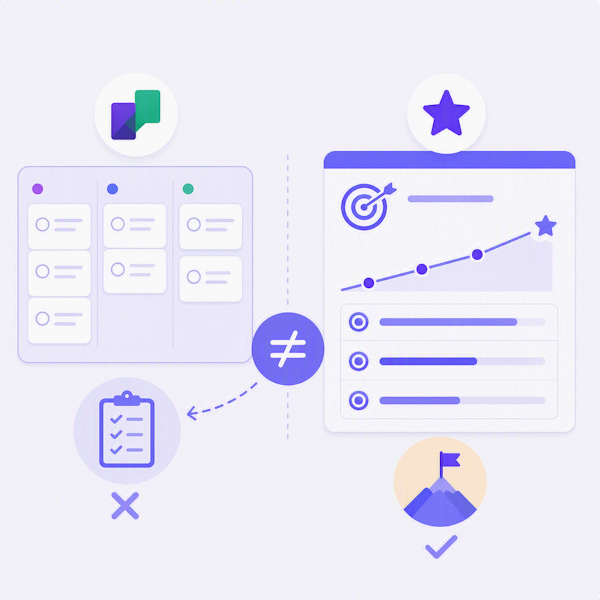
Microsoft Planner shows up in a lot of OKR conversations for a simple reason: most organizations already have it through their Microsoft 365 subscription. Reusing a tool you already pay for feels efficient. But Planner was built to organize tasks on a board, not to run an organization's objectives and key results. Teams that try it usually run into the same set of problems within a quarter or two, and several of them show up directly in real retrospectives from organizations that tried running OKRs in Planner.
Built for Tasks, Not Outcomes
Planner's core unit is a task card that moves between buckets like "To do," "In progress," and "Done." That works well for project work, but OKRs aren't about whether something got done. They're about whether a measurable result moved. A key result like "Increase trial-to-paid conversion from 8% to 15%" isn't a checklist item you can mark complete. It's a number that needs to be entered, tracked, and updated over time. As Andy Grove put it in High Output Management, the book that laid the groundwork for OKRs, output is what should be measured, not activity.
Because Planner only understands tasks, the conversation naturally drifts toward activities instead of results: which tasks are finished, who owns each one, and what the deadline is. What gets lost is the question that actually matters for OKRs: did the desired effect happen, is the Key Result trending in the right direction, and is the Objective actually moving forward. This is a common failure mode whenever a project tool gets repurposed for goal tracking.
No Real Progress Tracking or KR Concepts
Planner has no built-in concept of an Objective, a Key Result, a confidence score, or an ambition level. The percentage-complete you see on a Planner board is calculated from how many subtasks are checked off, not from actual progress toward a target. A key result can look "80% complete" simply because most checklist items happened to get ticked, while the underlying metric hasn't moved at all. There's no automatic calculation of goal achievement, so tracking and reporting progress becomes a manual, error-prone exercise every single cycle. Research from MIT Sloan Management Review makes the same point: goals need to be tied to specific metrics and milestones, not to a checklist, or people lose the link between their activity and the result.
No Aggregated View Across the OKR Portfolio
This is one of the most common complaints from teams who have actually tried it: Planner gives a poor overall picture across Objectives and Key Results. Each plan is its own isolated board, so there's no single screen that shows how every objective in the organization is doing. Leaders and stakeholders have no aggregated status, no dashboards, and no way to see the whole OKR portfolio at a glance. Getting that view means manually piecing information together from many separate boards.
Boards Can't Represent OKR Structure or Hierarchy
A Planner board is flat: buckets containing cards. It has no meaningful way to show the actual structure of OKRs, an Objective with several Key Results underneath it, each supported by activities. Nesting that hierarchy into buckets and labels quickly turns into a workaround that only makes sense to the person who built it.
The same problem shows up at a larger scale. Organizations running OKRs typically need levels such as Organization-OKRs, Area-OKRs, Department-OKRs, and Team-OKRs, all connected to each other. Planner has no native way to represent that hierarchy. As a program grows beyond one team, it becomes very difficult to see how a single team's Key Result actually contributes to a organization-wide goal.
Weak Link Between Strategy and Execution
When many activities are added into Planner, it often becomes unclear which Key Result a given activity is actually supporting, why that activity matters, or how it contributes to the Objective above it. Without an explicit link from task to Key Result to Objective, teams end up debating whether individual activities are even relevant to the goal they were supposed to serve, instead of debating the goal itself.
Information Gets Scattered Across Tools
In practice, Planner rarely holds the full picture on its own. Activities live in Planner, extra context and background live in separate Word documents, and status gets reported somewhere else again, often in a meeting or a Teams message. The result is duplication and inconsistency: the same piece of information exists in multiple places, and it's easy for those places to drift out of sync with each other.
No Weekly Check-in Workflow
OKRs work best with a lightweight, recurring habit of updating progress and confidence each week. Planner has no built-in check-in flow, no history of how a key result's value changed over time, and no way to flag that something is off track versus just incomplete. Teams end up rebuilding this process manually in spreadsheets or chat messages, which defeats the point of having a shared tool at all.
Reporting to Leadership Needs Extra Tools
Leaders generally want to see status per objective, trend over time, risks, dependencies, and overall goal achievement. Planner is primarily a task view, so getting that kind of picture usually means bolting on Power BI reports or falling back to manual follow-up meetings. That's extra tooling and extra manual work just to answer a question an OKR tool should answer natively: how are we actually doing this quarter?
Hard to Capture What Was Learned
OKRs are as much about learning and reprioritizing as they are about execution. When a Key Result isn't reached, the useful question is why: was the underlying assumption wrong, were the wrong actions taken, or was there simply not enough capacity? Planner has no natural place to capture that kind of reflection, so the reasoning behind a missed goal often disappears along with the quarter it belonged to.
Capacity Constraints Stay Invisible
Activities frequently get assigned to a Planner board before anyone has confirmed whether there's actually capacity to deliver them, a pattern especially common with shared IT resources. Planner will happily show the task either way. What it won't show is strategic capacity across all objectives at once, so overcommitment tends to surface only once teams are already behind.
Long Task Lists Hide What Matters Most
Once every objective accumulates its own long list of activities, a Planner board turns into exactly that: a long list. It becomes hard to tell which activities actually drive the most impact, which Key Results are the most critical to the organization right now, and which objectives should be prioritized first if capacity gets tight. Nothing on the board signals importance. Everything just looks like one more card.
No OKR-Specific Scoring
Planner has no concept of the 0.0-1.0 scoring model teams commonly use to grade OKRs at the end of a cycle. Every team that tries to use Planner for OKRs ends up inventing its own workaround, renaming buckets, adding custom labels, hoping everyone follows the same convention. Those workarounds rarely survive contact with a second team, let alone a whole organization.
Planner Isn't Wrong. It's Just a Different Tool
None of this means Planner is a bad product. It's a solid, lightweight task board, and it's fine to use it alongside an OKR tool to manage the day-to-day work that supports a Key Result. The problem is using it as the OKR system itself. Tasks and objectives are different things, and conflating them makes it harder to see whether the work being done is actually moving the numbers that matter.
Why Easy OKR Is a Better Fit
Easy OKR is built specifically around objectives and key results, not tasks. Key results are tracked as real, measurable values with a visible history, not checklist percentages. Objectives roll up cleanly from individual to team to organization, so everyone can see how their work connects to the bigger picture, and leaders get a single aggregated view of the whole OKR portfolio instead of a pile of separate boards. Weekly check-ins are built in, not bolted on. It's a standalone, simple tool that does one thing well, so you don't have to stretch a task board into something it was never designed to be.